If you are considering a smart lock for your Denver home, convenience is probably one of the main reasons. You can unlock your door without carrying a traditional key, create temporary access codes, check activity, and sometimes control the lock remotely.
However, choosing and installing a smart lock involves more than replacing your existing deadbolt. Your door, lock hardware, Wi-Fi or Bluetooth setup, smartphone, and security needs all matter. Before you buy a device, understanding these factors can help you avoid compatibility problems and unnecessary expenses.
APEX Locksmith Denver provides smart lock installation and programming, along with traditional residential lock services throughout the Denver metro area.
Check Your Existing Door and Lock
The first thing you should determine is whether your current door hardware is compatible with the smart lock you want.
Measure and inspect:
- Door thickness
- Backset distance
- Existing deadbolt or lock type
- Door-frame alignment
- Space around the lock
- Condition of the existing hardware
A smart lock may have excellent features, but it cannot compensate for a damaged, loose, or badly aligned door.
If your deadbolt sticks, requires excessive force, or does not extend smoothly into the strike plate, address that problem first. Installing electronic hardware on a mechanical problem can create more trouble later.
A professional Locksmith Denver technician can inspect the existing hardware and determine whether you need adjustment, repair, replacement, or a completely new installation.
Understand How the Smart Lock Works
Not every smart lock operates the same way. Before purchasing one, understand how you will actually use it.
Common access methods include:
- Smartphone apps
- PIN codes
- Fingerprint recognition
- Bluetooth
- Wi-Fi
- Key cards or tags
- Traditional physical keys
Some models communicate directly with your phone through Bluetooth, while others require Wi-Fi or a separate hub for remote access.
Think about your daily routine. If you mainly want keyless entry when you arrive home, a basic keypad model may be sufficient. If you want to lock your door while away from home, manage access remotely, or connect the lock with other smart-home devices, you may need a model with additional connectivity.
Consider What Happens When the Battery Dies
Smart locks depend on batteries, so you should have a plan for power failure.
Before installation, find out:
- What type of batteries the lock uses
- How long the manufacturer expects them to last
- Whether the lock provides low-battery warnings
- How you can access the door if the batteries die
- Whether an emergency power method is available
Some smart locks retain a physical key cylinder, while others provide an external emergency power connection.
Do not assume you will always receive a warning before the battery becomes completely depleted. Check the batteries periodically and replace them according to the manufacturer’s recommendations.
Think About Your Internet and Smart-Home Setup
If you want remote access, connectivity becomes especially important.
A smart lock can work perfectly as a local keypad but have different capabilities when connected to Wi-Fi. Your home’s wireless signal, smartphone compatibility, hub requirements, and smart-home ecosystem can all affect functionality.
Before buying, verify that the lock works with the devices and platforms you already use.
You should also keep your smartphone and lock application updated. Strong account passwords and properly secured home networks are important parts of maintaining any connected security device.
Decide Who Needs Access
One of the biggest advantages of a smart lock is access management.
Instead of making physical copies of a key, you may be able to create individual codes or digital credentials for family members, guests, cleaners, or service providers.
Before installation, consider:
- Who needs permanent access?
- Who needs temporary access?
- Should access expire automatically?
- Do you want an activity history?
- How will you remove access when someone no longer needs it?
This can be particularly useful if you manage a rental property or regularly have people coming and going.
For businesses, smart locks can also be part of a broader access-control strategy. Professional locksmiths can help determine whether a standalone smart lock or a more comprehensive system makes sense for the property. (Locksmith Denver Metro)
Don’t Ignore Mechanical Security
Smart technology does not automatically make a weak door secure.
Your overall protection still depends on the door, frame, strike plate, deadbolt, and installation quality. If the door itself is poorly reinforced, simply adding an electronic lock may not provide the security improvement you expect.
You should also consider whether the existing deadbolt is worn or outdated. If it is, replacing the hardware as part of the upgrade may make more sense than installing a smart component on an old mechanism.
A professional assessment can help you choose an appropriate solution instead of focusing only on the technology.
Professional Installation Can Prevent Common Problems
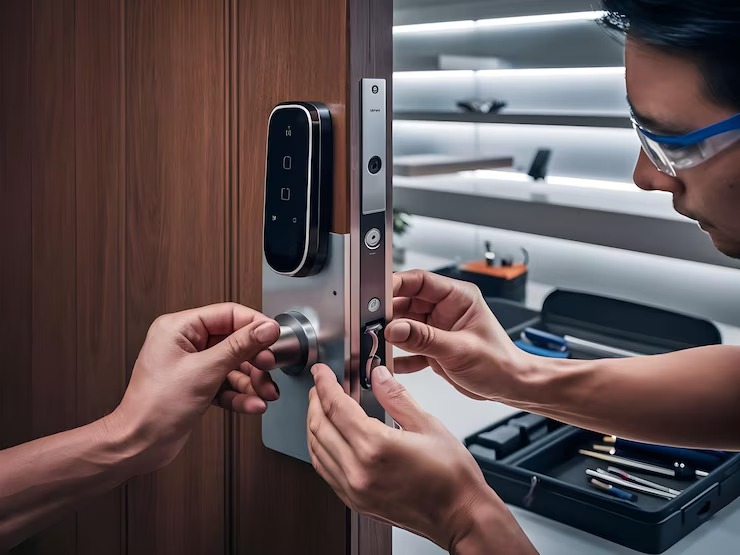
Smart lock installation may look simple, but incorrect installation can lead to alignment issues, unreliable locking, battery drain, or difficulty operating the door.
A professional Denver Locksmith can check the door and hardware before installation, install the device correctly, program its access features, and test the finished system.
APEX Locksmith Denver states that its smart lock services include installation and configuration for keyless entry, temporary access codes, remote locking, and integration with compatible home automation systems.
After installation, test the lock several times with the door open and closed. Confirm that the deadbolt extends completely, the keypad responds correctly, the app communicates properly, and any backup entry method works.
Plan for Your Backup Entry Method
Never rely on a single method of accessing your home.
Your backup plan could include:
- A physical key
- An emergency power method
- A second authorized user
- Manufacturer-supported recovery options
Keep your backup method secure rather than leaving a key in an obvious outdoor location.
You should also know how to regain entry if your phone is lost, the application stops working, or your home’s internet connection goes down.
Planning for these situations before they happen can prevent a convenient smart lock from becoming an emergency lockout problem.
Choose the Smart Lock Based on Your Needs
The most expensive smart lock is not automatically the best option for your home.
Instead, compare features against your actual requirements. If you only want keyless entry, you may not need advanced remote-control features. If you manage multiple users or need remote access, additional functionality could be worthwhile.
Consider the lock’s:
- Compatibility
- Security features
- Battery system
- Connectivity
- Backup entry options
- User-management capabilities
- Warranty and manufacturer support
You can also review your existing security hardware before deciding whether a smart lock is the right upgrade.
If your current locks are damaged or outdated, you may benefit from addressing those issues at the same time. A professional can explain whether repairing, rekeying, replacing, or upgrading the hardware is the most practical choice.
Get Your Smart Lock Installed Correctly
A smart lock can make your daily routine easier while giving you more control over who enters your property. But the best results come from choosing compatible hardware, maintaining the mechanical components, securing the connected technology, and having the lock installed correctly.
If you are unsure which smart lock will work with your Denver home’s existing door, APEX Locksmith Denver can evaluate your setup and help you choose a practical solution. You can also review the company’s broader residential locksmith services in Denver for additional home security needs.
When you are ready to discuss installation or have questions about your existing locks, contact APEX Locksmith Denver for professional lock assistance.
Frequently Asked Questions
1. Can any door use a smart lock?
Not necessarily. Compatibility depends on the door thickness, existing hardware, deadbolt type, backset, and alignment. A professional can inspect your door before installation and identify whether the smart lock you want will fit properly.
2. Are smart locks safe for homes?
Smart locks can provide secure and convenient access when properly selected, installed, maintained, and configured. You should also use strong account credentials, keep software updated, monitor batteries, and maintain a reliable backup entry method.
3. What happens if my smart lock battery dies?
The answer depends on the model. Some smart locks provide a physical key cylinder, while others have an emergency power option. Always understand your lock’s backup entry procedure before relying on it.
4. Do smart locks work without Wi-Fi?
Many smart locks can still provide local access through a keypad, Bluetooth, or physical key when Wi-Fi is unavailable. However, remote features may require Wi-Fi or another compatible connection.
5. Should a locksmith install a smart lock?
Professional installation can help ensure proper alignment, secure mounting, programming, and reliable operation. It is particularly useful if your existing lock is damaged, difficult to operate, or incompatible with the smart lock you selected.